AI in Tenvara
AI that does the work, not the marketing.
No chatbot stuck on the side, no buzzwords. Tenvara's AI works on the same tickets, devices, documentation and history your team does, because it is built into the same app. It reads, checks and drafts. Your technicians decide.
Not AI for the sake of AI
Built in from the start, not bolted on after.
Most AI in IT tools only sees the text you paste into it. Tenvara's AI sits on the platform itself, so it can look at the device on the ticket, its monitoring history, its backups, the customer's documentation and every similar ticket you have solved before. That is the difference between a clever sentence and a useful answer.
One platform, one context
Tickets, devices, monitoring, backups, Microsoft 365, documentation and chat live together, so the AI works from the whole picture instead of a copy and paste.
Aimed at real jobs
Every feature exists because it takes minutes off something technicians do every day: setting up tickets, catching up on threads, writing replies and finding out why a machine is slow.
People stay in charge
AI reads, checks and drafts. Technicians review, edit, send and run. Anything AI writes is marked as AI, with who asked for it.
What you can use it for
Useful on day one, across the whole platform.
Switch on the features you want, choose the model for each, and decide when AI steps in by itself.
Triage new tickets
Suggests the type, priority, queue, assignee and symptom for each new ticket, with a confidence and a reason. Apply one field or all of them.
Read the guideSummarise long threads
Forty messages in, the summary at the top tells you the key points, who it is waiting on and the next step.
Read the guideDraft replies and updates
Drafts a reply or a customer update from your knowledge base, similar resolved tickets and the thread itself. It lands in the composer for you to edit and send.
Read the guideInvestigate a device
Finds the device on the ticket, runs read-only checks and posts an internal note with likely causes, evidence, charts and suggested fixes.
Read the guideAsk AI about a device
Ask a plain question about a ticket or a machine. The answer uses the same read-only checks and is saved as a note or in the device activity.
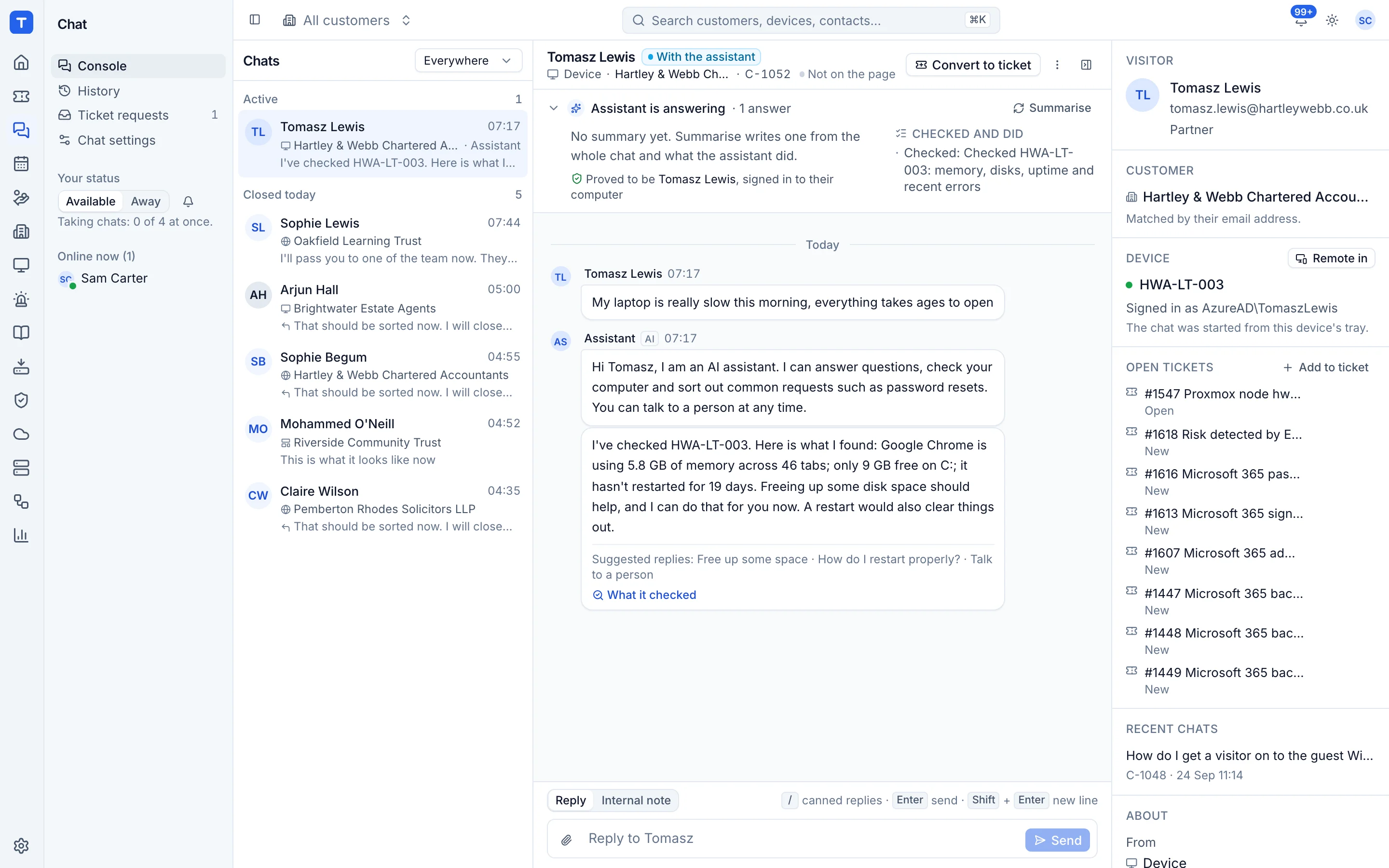
Read the guideAnswer chats first
An assistant on your website, portal and tray that answers from your knowledge base and the customer's documentation, and hands over to your team when it should.
Read the guideSelf-service actions
Password resets, MFA resets, unlocking accounts, out-of-office, shared mailbox access, freeing disk space and more, each confirmed by the person before it runs.
Read the guideCustomer report summaries
Monthly customer reports can open with a plain English summary of the month, written from the real data and marked as written by AI.
Read the guideHow it works in practice
"My computer is really slow."
The ticket every MSP knows. Here is what happens before anyone remotes in.
-
1
The ticket arrives
Triage suggests the queue, priority and symptom. Tenvara works out which computer is meant from the ticket and the devices that person signs in to.
-
2
AI investigates
Investigate with AI runs read-only checks on that machine through the Tenvara agent you already have installed.
-
3
A note with evidence
An internal note lands on the ticket: the likely causes, the evidence behind each one, charts, and the fixes it suggests.
-
4
A technician decides
Your technician reads it, picks a fix and presses Run. It runs with their permissions and is logged against the ticket.
What the investigator looks at
- Agent status, uptime, pending restarts and live CPU, memory and disks
- Processes, services, startup items, events and crashes
- Monitoring history against the same period before
- Apps and updates installed, removed or failed around when it started
- Backup jobs on the device
- Microsoft 365 sign-in problems for the user
- Similar tickets and matching knowledge base articles
Every note ends with "Check it before acting on it." It is a head start for your technician, not a replacement.
The rules it always follows
Safe enough to use on real customers.
An MSP platform can reach every machine and tenant you look after. So the AI works inside firm rules, and you can see exactly what it did.
It suggests. People act.
Nothing goes to a customer until a technician presses Send. Fixes run when a technician presses Run, with that technician's permissions.
Checks are read-only
The investigator can look at a device, its history, alerts, backups and sign-ins. It has no way to change anything.
Customer text is data
Ticket and chat messages are treated as data, never as instructions, with fixed rules that cannot be edited away.
Only what it needs
Each feature sends only what it needs. Passwords and the credentials vault are never sent, and any customer can be opted out entirely.
Everything is logged
Who asked, about what, which model, the tokens, the cost and every check it ran, in one activity log.
Costs you can see and cap
You use your own Anthropic key and pay Anthropic directly. See the cost per feature, model and customer, with caps per ticket and per month.
Questions
AI, straight answers.
Anything else, ask us. A person who knows the platform will reply.
Anthropic's Claude models, through your own Anthropic API key. You choose the model for each feature in Settings > AI, and you pay Anthropic directly for what you use.
Tenvara calls Anthropic's API, and Anthropic does not train its models on API inputs and outputs by default under its commercial terms. On top of that, Tenvara sends only what each feature needs, never sends passwords or the vault, and lets you opt any customer out.
It is your choice. AI switches on when an administrator adds a key, feature by feature, and you decide when it steps in by itself. Every other part of Tenvara works the same either way.
Only through a fix a technician chooses to run, with their own permissions. The one exception is a named low-risk fix that a customer has agreed can run on its own, and that is logged like everything else.
Settings > AI shows what AI costs by feature, model and customer, and you set spending caps per ticket and per month. You choose the model and effort for each feature, so quick jobs like triage can use a cheaper model.
Try Tenvara on your own MSP.
Your own hosted instance, free for 30 days, with no card needed. Tenvara is in beta, so you get a direct line to the team building it.