Tenvara for IT teams
ITSM for in-house IT teams, with everything else built in.
Incidents, requests, problems, changes and SLAs, an employee portal with manager approvals, and the devices, Microsoft 365, backup and security behind them. One app for the team that keeps your organisation running.
- Built around departments and employees
- Manager approvals before IT acts
- Hosted or on your own servers
- IT spend by department, against budget
Why Tenvara
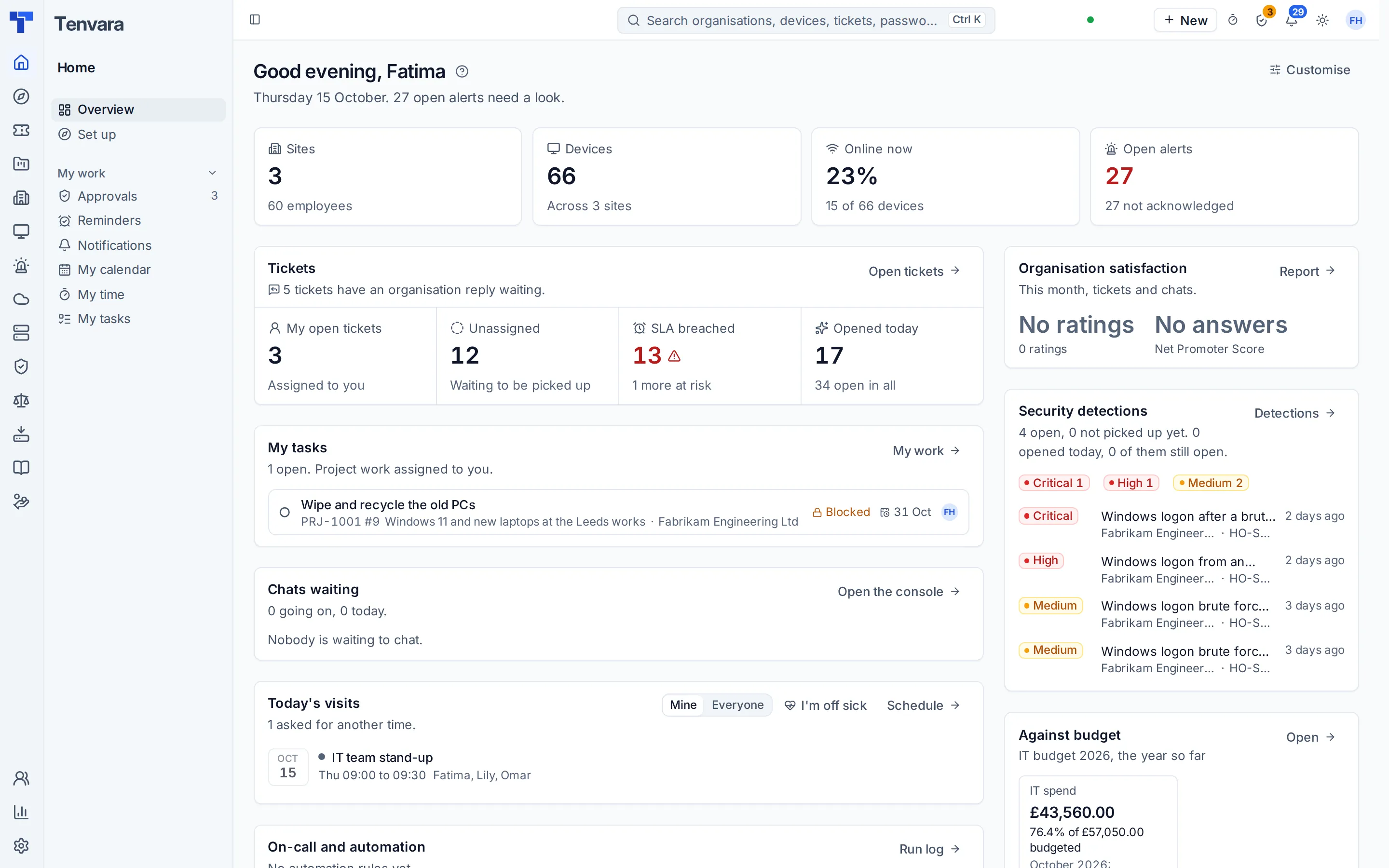
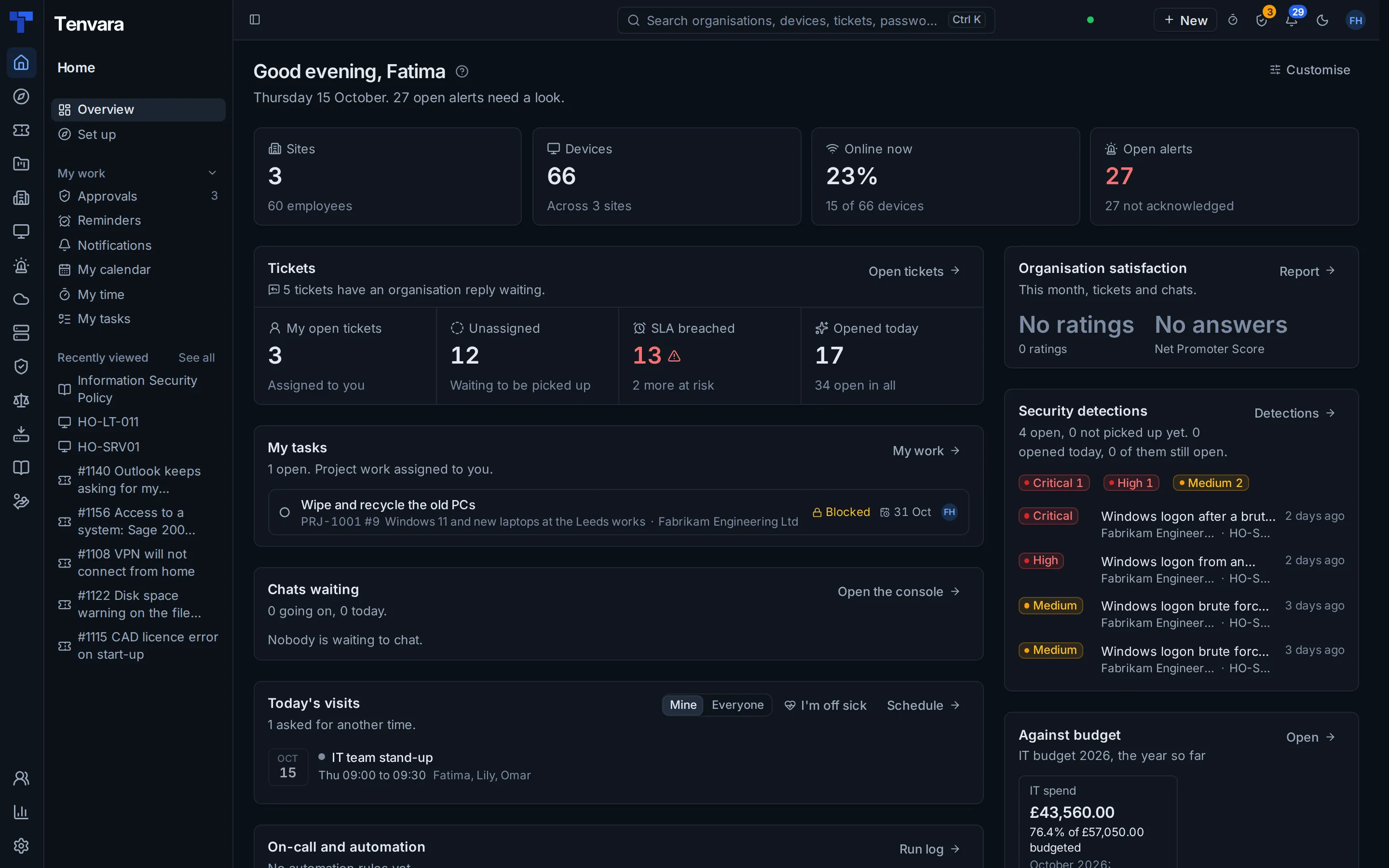
Most IT teams run a service desk in one tool, then manage the computers, the backups, Microsoft 365 and the passwords in four others. Tenvara is the service desk and all of those, built as one app.
For your IT team
The employee, their department, their devices and the history on one screen, with Remote in a click away.
For your employees
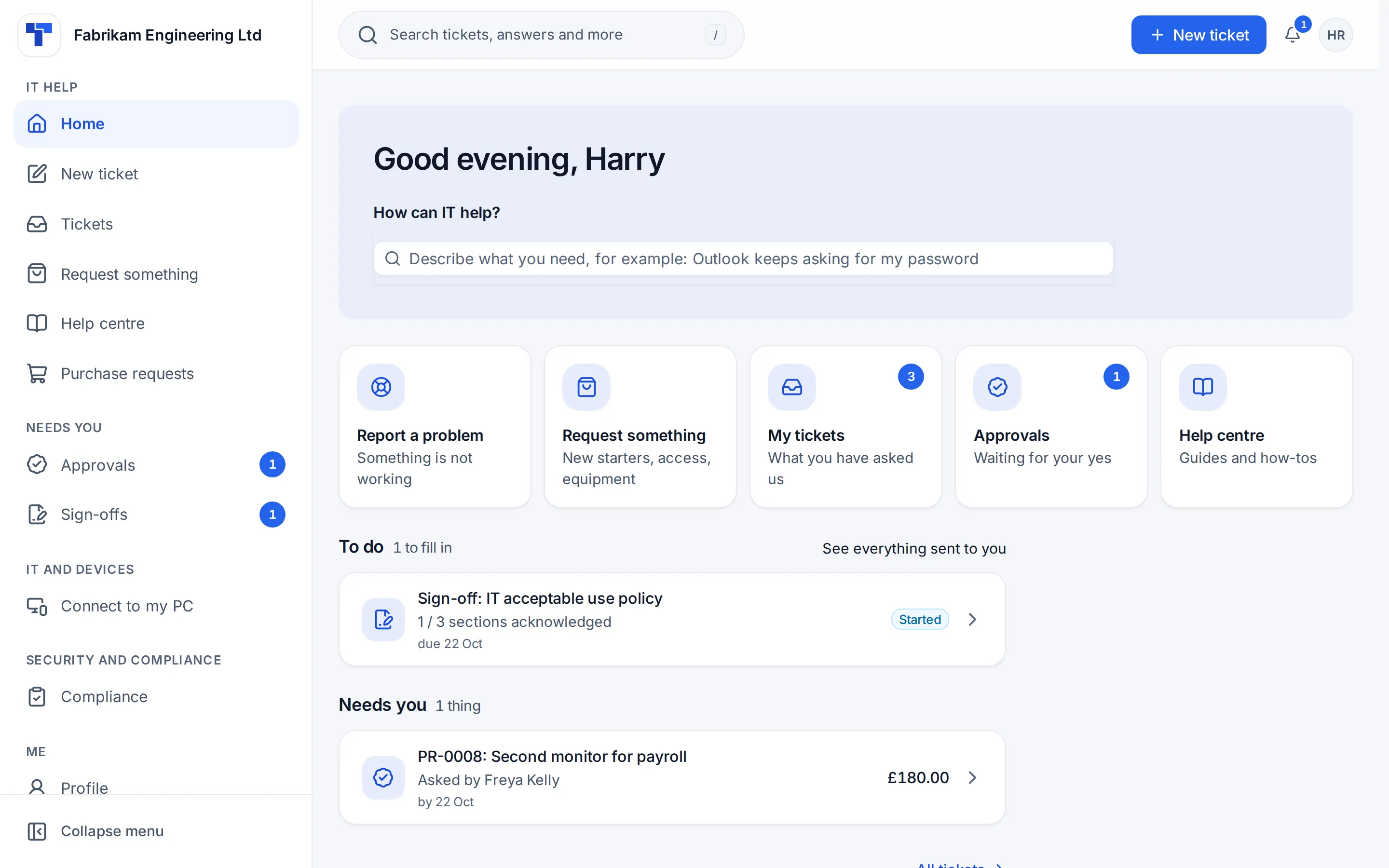
One portal to ask for help, request what they need and see how it is going, with their manager approving in a click.
For your leadership
Service levels met, requests by department and IT spend against budget, in a quarterly update they will actually read.
Who it is for
For the people who keep an organisation's IT running.
If your team looks after its own organisation, Tenvara is shaped around you: one organisation, its sites and departments, and the employees in them.
Schools and academy trusts
One team looking after classrooms, offices and every site in the trust, with staff who need a laptop sorted before Monday's lesson.
Councils and public bodies
Departments with their own budgets and managers, changes that need a proper record, and services residents rely on.
Charities
A small IT team, staff and volunteers spread across sites, and every pound of IT spend accounted for.
Hospitals and health trusts
Clinical and office systems that cannot go down unannounced, major incidents handled in the open, and devices kept patched and protected.
Law firms and professional services
Fee earners who need answers fast, client data kept safe, and partners who want to see what IT is doing.
Manufacturers
Offices, shop floors and warehouses on one estate, kit with a long life to plan replacements for, and suppliers to keep on top of.
Any business with its own IT team
From two people in IT to a full service desk with a change board, supporting your own employees.
Two people in IT or a full service desk with a change board, the same product grows with you.
Getting started for IT teamsIT service management
A complete service desk, not a ticket list with extras.
The practices your team runs every day, built to work together on the same employee, device and department records.
Incident management
Every issue logged once, with the employee, their department and their devices already on the ticket.
How it worksService requests and the catalogue
A catalogue of things to ask for, each with its own form, a manager's approval and a clear "what happens next".
How it worksProblem management
The cause behind repeat incidents, worked once, with known errors written up for the knowledge base.
How it worksChange management
Standard, normal and emergency changes with risk, plans, approvals and a change calendar that warns about clashes.
How it worksMajor incidents and status pages
One timeline, one update to everyone affected, a portal banner, a status page and a review afterwards.
How it worksSLAs, business hours and escalations
Targets by priority, department or VIP, in business hours or around the clock, with escalations before anything is missed.
How it worksKnowledge and the employee portal
A knowledge base for your team, a Help centre for employees, and one portal for everything they need from IT.
How it worksAssets and configuration
Every device and its inventory, warranty, cost and book value, with documentation linked to it and a map of each site's network.
How it worksSuppliers and supplier contracts
Who you buy from, the agreements you hold and every notice date worked out before it catches you out.
How it worksPurchasing and IT spend
Purchase requests approved by the manager and purchasing, purchase orders, and IT spend by department against budget.
How it worksReporting and the IT leadership update
Service desk reports, a report builder, dashboards and a quarterly IT leadership update for your management.
How it worksAutomation and on-call
Rules across tickets, alerts and devices, and on-call rotas that page the right person.
How it worksAI assist
Optional triage, summaries, drafts and device investigations, with your own Anthropic key and a person deciding.
How it worksITSM for in-house IT teams
Every practice, with screenshots and the guide behind it.
The employee portal
Employees ask. Managers approve. IT gets on with it.
The portal asks "How can IT help?" and puts the common jobs first. A laptop, software, access to a system or a new starter goes to the employee's department manager, then to IT, without a single chasing email.
-
1
They ask in the portal
Request something is your service catalogue. Each item asks only the questions that apply, with the cost of each option where it has one.
-
2
Their manager approves
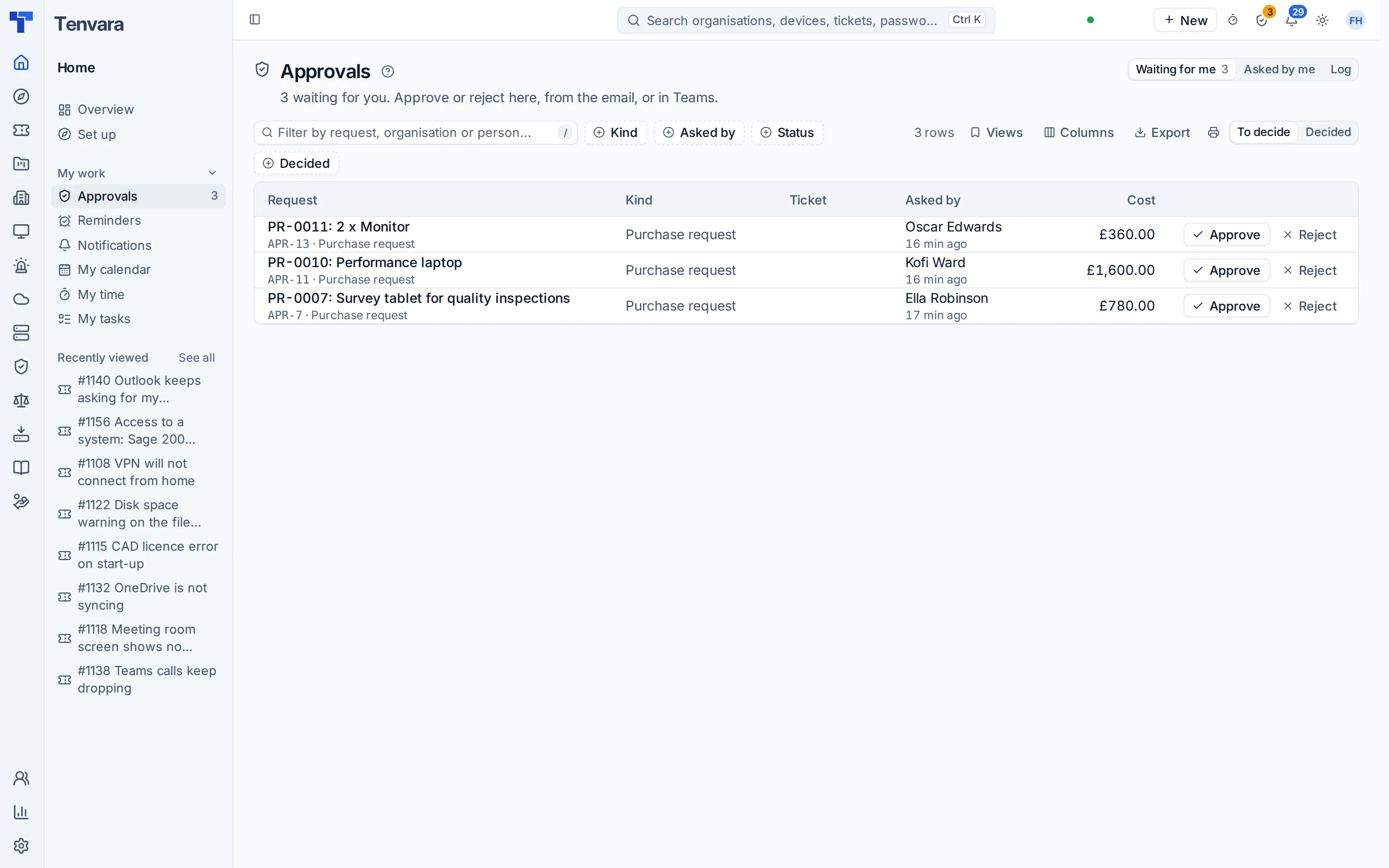
From the email or in the portal under Needs you. If the manager is away, their delegate decides, and the approval notes whose place they took.
-
3
IT or purchasing decides
For every request, only over an amount, or never: you choose per kind of request. Kit that costs money raises a purchase request by itself.
-
4
It becomes the work
A ticket with every answer written out, and automations such as a new starter's Microsoft 365 account made on the right day.
Everything else in the same box
The service desk and the estate it looks after, together.
An ITSM tool tells you a laptop is slow. Tenvara also manages the laptop, patches it, backs it up, watches it for threats and lets you remote in from the ticket.
Replace the stack
An ITSM tool, an RMM, a backup product, a Microsoft 365 tool and a password manager. Or one app.
Every separate product is another contract, another agent on your computers, another login for the team and another integration to keep working. Tenvara does these jobs itself, on the same records.
What IT teams often buy
- IT service management
- Self-service portal
- Endpoint management and monitoring
- Patch management
- Software deployment
- Remote support
- Device and server backup
- Microsoft 365 backup
- Microsoft 365 and Intune management
- Security log monitoring
- Vulnerability scanning
- Documentation
- Password manager for IT
- Status page
Tenvara
- One app and one sign-in for IT
- One agent on every computer
- One portal for every employee
- One alert list and one search
- One record per device and per employee
- One set of roles and permissions
Hosted by us or on your own servers, with the same features either way.
ITIL 4
Speaks your team's language.
If your service desk follows ITIL 4, you will find the practices you know: incidents, service requests, problems and known errors, change enablement, service levels, knowledge, assets, suppliers and continual improvement, each backed by a real feature.
See the ITIL 4 map- Incident management
- Service request management
- Problem management
- Change enablement
- Service level management
- Knowledge management
- IT asset management
- Supplier management
Your servers or ours
Keep your data where your policies say it lives.
The same Tenvara either way. Pick what suits your data protection rules, your auditors and your team.
Hosted by us
Your own instance at yourname.tenvara.app, with its own database. We look after it, so your team only has to install the agent.
- Your own instance and database, never shared
- Updates applied for you
- Backups of your instance, certificates and monitoring handled
Self-hosted
One Docker Compose install on a Linux server you run: in your own server room, your data centre or your cloud account, in the country you choose.
- Your data stays on infrastructure you control
- Signed release images, checked before they start
- A daily licence check-in with counts only, never your data
Security and compliance
Built for a team that holds the keys to everything.
Your IT platform can reach every computer and your whole Microsoft 365 tenant. Tenvara is built to deserve that access, and to help you prove it to your auditors.
Single sign-on and two-factor
Microsoft Entra ID, Google Workspace, OpenID Connect or SAML 2.0, with groups mapped to roles, or local accounts with two-factor and passkeys.
A switch for each sensitive action
Running scripts, revealing credentials, restoring backups, remote control and Microsoft 365 changes each have their own role switch, and risky actions can need a second person.
A tamper-evident audit log
Sign-ins, settings, permissions, exports, remote sessions, scripts, credentials and Microsoft 365 actions in one hash-chained log, checked every day.
Encrypted, audited secrets
Credentials are encrypted at rest and every reveal records who, what and when. BitLocker recovery keys and local admin passwords sit behind the same vault.
Retention and privacy requests
Keep each kind of data as long as you choose, with legal holds, and handle data protection access and erasure requests from the app.
Your own compliance programme
Frameworks and controls, policy documents, a risk register, audits, Cyber Essentials readiness and awareness training, run from the same data.
In the knowledge base
Read exactly how it works
Questions
What IT leaders ask us first.
Anything else, ask us directly. A person who knows the product will answer.
Tenvara supports the ITIL 4 practices an internal IT team runs every day: incident, service request, problem and change management, service level management, knowledge, IT assets, monitoring, deployment, supplier management and more. Our ITIL 4 page maps each practice to the feature behind it. Tenvara is software, not a certification, so using it does not make your team ITIL accredited.
Yes. The employee portal lets people raise and follow tickets, ask for equipment, software and access from your service catalogue, read the Help centre, chat with IT, see the status page and their own devices, and approve or sign what is waiting for them. They sign in with their work email address or their Microsoft work account, and portal roles decide what each person sees: a department head also sees the tickets and requests of the departments they manage.
A request goes to the manager of the employee's department first, then to IT. If a department has no manager, the department above decides, and if there is nobody to ask it goes straight to IT with the reason. A manager who is away is stood in for by their delegate. You set the rules for software, hardware and access in Settings, and you can build longer chains, for example a director over a certain amount.
For IT teams Tenvara runs as the Company edition, which your licence sets, and it is shaped around one organisation: yours. Its menus, settings, reports, emails and PDFs speak in departments and employees, approvals go to the employee's manager, and the money side is purchasing and IT spend against your budget. A new install starts with the service desk and your devices, and you switch on the rest one module at a time.
Yes. Connect Microsoft 365 and your employees arrive by themselves, with leavers flagged for you to confirm. Sites, employees, devices, assets and credentials import from CSV files with a dry run first, and documentation and passwords come across from IT Glue or Hudu. Running an import again updates what is there rather than duplicating it, so you can keep your old tool running while you move.
Either, with the same features. Hosted, you get your own instance and your own database, and we look after updates, backups of the instance, certificates and monitoring. Self-hosted, Tenvara is one Docker Compose install on a Linux server you run, in your own data centre or cloud account, so your data stays on infrastructure you control.
You connect your own tenant once with admin consent, and there is nothing to map. Employees, licences and security settings arrive by themselves. From there you manage users, groups and mailboxes, check the tenant's security, deploy baselines, manage Intune and Autopilot, back it up and run starters and leavers the same way every time.
AI is optional and off until an administrator adds your own Anthropic key. Each feature sends only what it needs, passwords and the credentials vault are never sent, and every AI action is logged. Replies and fixes always wait for a person. Without a key, every other part of Tenvara works the same.
Tenvara for IT teams is the same product, with every feature included, hosted or self-hosted. It is new and in beta, and we are working out pricing with our beta members, so it is announced before launch. Apply for early access and tell us about your team, or get launch updates by email, and you will hear first, with no obligation.
Yes. The Tenvara app for iPhone, iPad and Android has tickets, alerts, devices, remote control and credentials, with offline working and a biometric lock, so your team can deal with things between sites.
Give your IT team one place to work.
Tenvara for IT teams is in early access. Apply and tell us about your organisation, or get launch updates by email and hear first when pricing for IT teams is announced.