Skip to content
Tenvara is coming soon. Get early access

Infrastructure and connectivity

Servers, desktops, networks, lines and printers without another console

The same agent looks after Proxmox and Hyper-V hosts, Docker hosts, Remote Desktop Services deployments and Linux and Windows web servers, reads NAS units and firewalls on the customer's network with nothing installed on them, watches every site's internet line and phone service, and manages your customers' printers from deployment to secure release. It all shows up next to the customer and raises alerts into the same list.
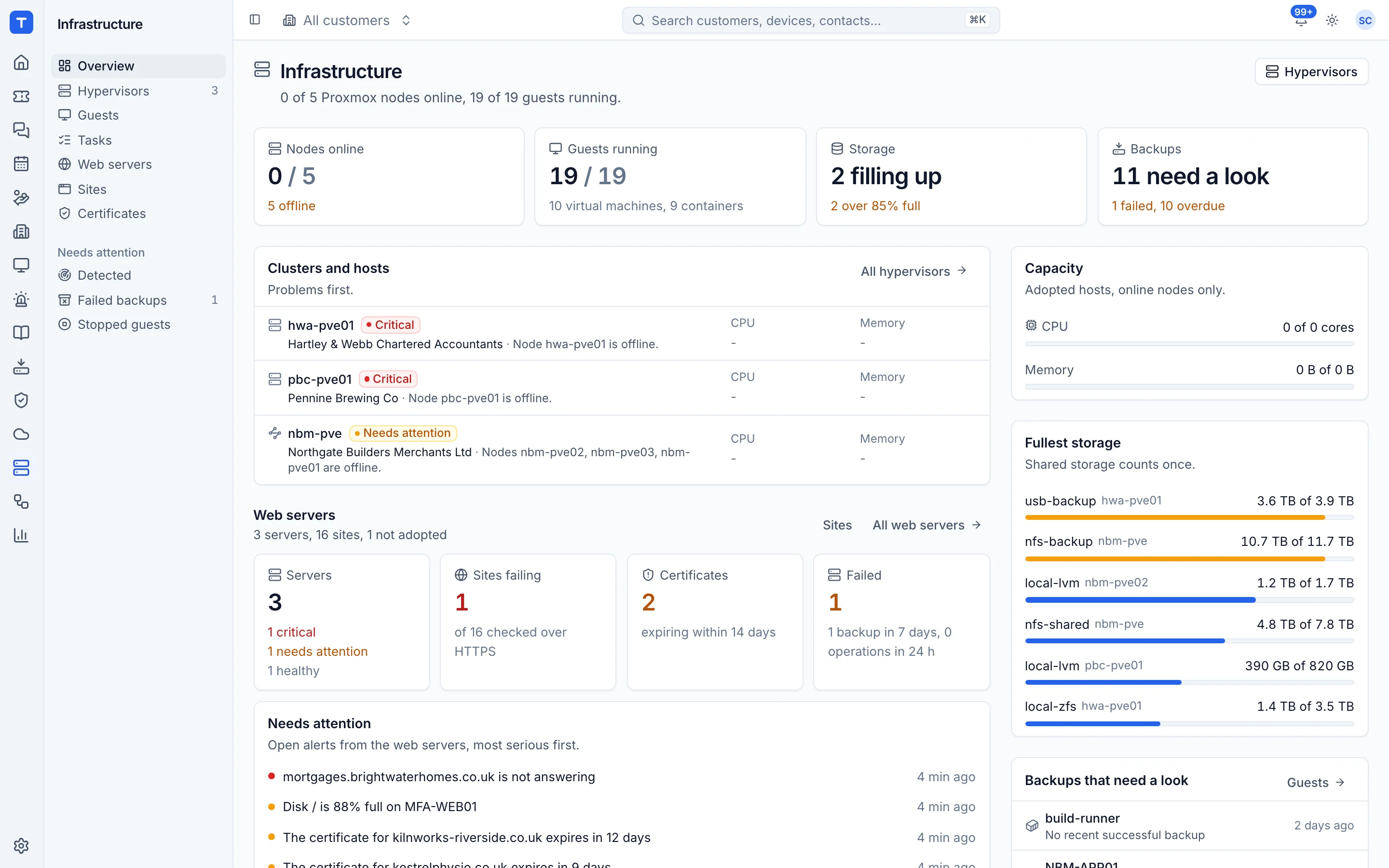
Proxmox clusters and nodes with status

Proxmox and Hyper-V

Hosts, virtual machines, checkpoints and replication, cluster updates that move guests off live or leave them where they are, hosts patched without surprise restarts and a degraded storage pool raising its own alert.

Virtual desktops

Remote Desktop Services deployments with who is on what, connection quality, published apps and golden images tested before they roll out.

Docker hosts

Found by the agent, with containers, image updates that roll back by themselves and whole Compose projects backed up with their databases.

Web hosting

Linux and IIS sites, Nextcloud and PHP apps, SQL Server and MySQL, reseller accounts, one-click WordPress admin sign-in and site checks you choose.

Lines and phone services

Every site's lines and phone services with supplier, contract dates and one status each, measured against the SLA.

Print management

Deploy printers, hold jobs for secure release, set quotas and scan to email.

Remote Desktop Services under control

Tenvara finds your customers' RDS deployments and, once you adopt one, shows its collections, session hosts, licences, gateway, certificates and FSLogix profiles. The Sessions tab says who is on which host and how good their connection is, on the customer and on their ticket too, with message, log off and shadow from there. Draining, restarts, published apps and profile resets go through your approvals, and people can log off a stuck session or reset their own profile in the portal.

  • Published apps given and taken away through groups
  • Connection quality for every session, and a pool alert when it stays poor
  • Session peaks, licence use and logon time reports

Golden images with a safety net

Build each new desktop image patched and with its apps, by hand or on a schedule, then test it on an isolated host that signs a test user in, times the logon, starts the apps and checks for new critical vulnerabilities. It goes for sign-off, here or by the customer in their portal, and rolls out a few hosts at a time with Roll back, every step kept in one logged run.

  • Every version with who built, tested and signed it off
  • Versions compared, with drift alerts
  • Prepare the agent once and every clone enrols as itself

Docker hosts, found and looked after

Every server running Docker or Podman is found by the agent, with its Compose projects, containers, images, volumes and networks on a Containers tab. Newer images go on with Update now or in the patch window and roll back by themselves if the health check fails. Tenvara alerts when a container that should run stops, loops or turns unhealthy, never for a clean exit, and backs up whole projects with a dump of each database to restore onto the same or another host.

  • Start, stop, logs, a shell and prune, each behind its own role switch
  • A second person for hosts tagged production
  • Nothing opened to the network: the agent reads the engine locally

NAS units and firewalls, with nothing installed on them

An agent at the site reads a TrueNAS through its own read-only user: pools with their errors, damaged files, scrubs, disks with temperature and SMART, replication and snapshot tasks, and the NAS's own alerts. pfSense, OPNsense and MikroTik firewalls and routers are read the same way, share one set of alerts for WAN links, tunnels, firmware and configuration changes, and get a daily configuration backup sealed in the vault.

  • Found on the network and offered to add, or ignored with a reason
  • Pool scrub alerts for NAS units and Proxmox hosts
  • Open the unit's own web page through the agent

Certificates and web servers that tell the truth

One Certificates list holds every certificate Tenvara knows, from websites, domain checks and devices, soonest to expire first, with where each is used and Renew or Check on the row. Each web server says whether it hosts a public website, serves only inside, shows a default page or serves nothing, checked from the internet every day, so hosting counts and web alerts only cover the servers that matter.

  • A Source filter for websites, domains and devices
  • Nextcloud and PHP apps with their own PHP settings for each site
  • A live console for long jobs, with secrets masked

Every line and phone service, with one status each

The Telephony and connectivity module keeps one list of each site's lines and phone services: fibre, leased lines, 4G and 5G, Starlink and cable, hosted and on-premises phone systems, SIP trunks and analogue lines. Each carries its supplier contract's end and notice dates, speeds, the fault line number, its backup line and when failover was last tested. Filter for sites with no backup line, copper lines facing switch-off, contracts ending soon or anything down now.

  • Add by hand or import a provider's circuit list
  • Lines suggested from what your devices already see
  • A Connectivity tab on every customer and site
  • A module you switch on when you want it

Know whose fault it is before you ring the supplier

One device per site acts as a probe. It pings the gateway, the provider's first hop and the internet every few seconds, so a fault on the LAN, at the provider or beyond is told apart, and it sees the moment a site fails over to its backup line. Outages are recorded with the route traces, monthly availability is measured against the contracted SLA, and Raise a fault fills in the circuit, the account, the times and the evidence for the supplier.

  • A claim file per line and month
  • One alert when the same provider is down at several customers
  • Estimated call quality per site from latency, jitter and loss
  • Connect your own 3CX, Yeastar or Teams Phone account

Printers as part of the device estate

See printers per customer and site and deploy them to devices through the agent, instead of logon scripts and group policy. Hold confidential jobs until the person releases them at the printer, price colour and mono pages, set quotas, and let guests print by upload.

  • Deploy to devices, users or Entra groups
  • Drivers found from the Microsoft Update Catalog and the makers' universal drivers
  • Secure print release, quotas, guest printing and scanning
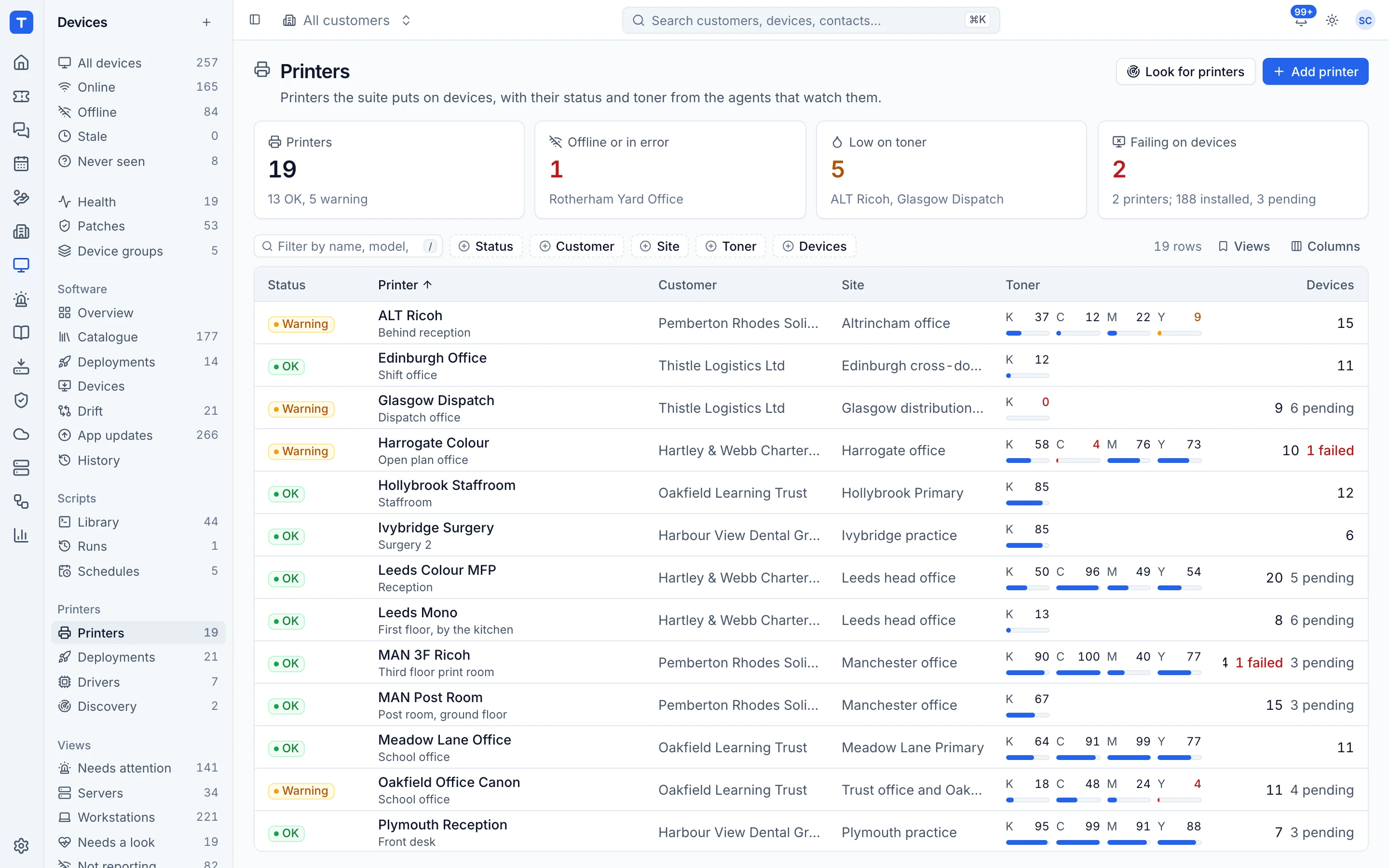
Printers per customer and site

In the knowledge base

See exactly how it works

Virtual desktops: finding and adopting deployments How the agent finds Remote Desktop Services deployments, how to adopt or ignore one, what an RDS deployment's page shows, and which actions wait for an approval. Sessions, who is on what and connection quality See who is on which virtual desktop now, act on a session from the Sessions tab, a customer or a ticket, read a session's connection quality and let people fix their own session from the portal. Golden images Keep the golden image of each RDS collection with every version, then build, test on an isolated host, sign off and roll out a new version in stages, with roll back and drift alerts. Pool machines and non-persistent desktops Prepare the agent in a golden image so every clone enrols as itself, keep a reset desktop on its own record, leave machines switched off on purpose out of offline alerts, and count pool machines fairly for billing. Published apps, printing and reports for virtual desktops See and change what an RDS deployment publishes and who gets it through groups, find printing problems on session hosts before people ring, and report on session peaks, CALs, logon times and rightsizing. My virtual desktop in the portal How people on Remote Desktop Services fix their own stuck desktop from the portal: which desktop they are on, logging off a stuck session, restarting their own desktop, resetting their profile, your per-customer settings and the ticket each request makes. Docker hosts and containers How the agent finds Docker Engine and Podman, what the Containers tab and the Docker hosts list show, and the alerts Tenvara raises for containers that stop, loop, fail their health check or fill the disk. Updating, backing up and managing containers See which containers have a newer image, update them with Update now or in the patch window with automatic roll back, back up Compose projects with their databases, and start, stop, read logs, open a shell or prune from Tenvara. NAS monitoring without an agent on the NAS Add a customer's TrueNAS with a read-only user, let an agent at the site read it, and watch its pools, scrubs, disks, tasks and the NAS's own alerts from one page. Firewalls and controllers Watch pfSense, OPNsense and MikroTik firewalls and routers through an agent at the site with a read-only account, with one shared set of alerts, a daily configuration backup in the vault, and firewalls found on the network offered to add. Every certificate in one list Infrastructure > Certificates lists every certificate Tenvara knows, from websites, domain checks and devices, soonest to expire first, with a Source filter, where each is used and Renew or Check on the row. Public website or internal only How Tenvara tells a web server that hosts public websites from an internal box, a welcome page or a web server that serves nothing, and what each badge changes. Nextcloud, PHP apps and per-site PHP settings Host Nextcloud on a Linux web server, give a PHP app more memory, bigger uploads or the functions it needs within limits you set, add folders outside the site and a reviewed nginx include. Restarting and patching hypervisor hosts The built-in Hypervisor hosts group and patch policy that install updates but never restart, the Restart needed flag, Restart this host for Proxmox VE, and what to do with a paused update run. The live job console Watch every command a long agent job runs and its output as it happens, with secrets masked, search, Copy the log and Download log, and the whole log kept with the job and its ticket. Hyper-V hosts and virtual machines How the agent finds Hyper-V hosts, adopting a host, the host and virtual machine pages, integration services, power actions, checkpoints, replication health and backups of Hyper-V virtual machines. The hosting panel, resellers and site owners Give customers a hosting panel for their own websites, with plans and quotas, site owner and reseller accounts, people with roles, and what they can do in the panel. Windows hosting: IIS, SQL Server and MySQL Host static and .NET sites on Windows Server with IIS, with application pools, bindings, applications, rewrite rules, web.config, FTP, and SQL Server and MySQL databases side by side. Telephony and connectivity overview What the Telephony and connectivity module does, how to switch it on, who can use it, where its pages are in the menu and what needs your own phone system account. Lines and phone services Record each site's lines and phone services by hand, from a supplier's circuit list or from suggested lines, with backup lines, failover tests, contract dates and copper switch-off dates, and filter the list for what needs a look. The site probe and outside checks Choose one device per site to watch its lines from inside, tell a LAN, ISP or internet fault apart, see failover to the backup line, run capped speed tests, and check lines and phone systems from outside. Outages, SLA and raising a fault How outages are recorded and given a cause, how each month's availability is set against the contracted SLA, the claim file per line and month, and Raise a fault with the supplier by ticket, email or both. Connecting a phone system Connect a customer's own 3CX, Yeastar or Teams Phone account, or watch any other phone system with standard checks: what each needs, where the secret is kept, what the page shows and how call records are collected. Call quality The estimated call quality (MOS) for each site worked out from the site probe, how a poor call is set against the line at that moment, the customer's VoIP block, and the thresholds in Settings > Telephony. Secure print release Hold print jobs encrypted on each computer until the person releases them at the printer, from the portal, a phone, a release station or with a code on the printer. Print quotas and costs Price mono and colour pages, count every job, set quotas that warn or stop printing, and report usage by person, department, printer and customer. Mobile, guest and self-service printing Let people print from a phone or any device by uploading in the portal, give visitors a guest code to print, and let staff add the office printers to their own computers. Driver sources and the device for printer work Where Tenvara looks for a Windows printer driver and in what order, what your server needs to reach, how to switch a source off, what a printer reports about itself, and how to choose the one device at each site that does the printer work. Scanning Let the office printers scan to email through a computer at the site, with scans to a person's own address delivered to them and shared addresses handled by scan profiles.

Tenvara is coming soon.

We're inviting MSPs to the beta in small groups. Apply to join, or get launch updates by email and hear first when pricing is announced.