Compare: Quoting and sales
QuoteWerks alternative: Tenvara
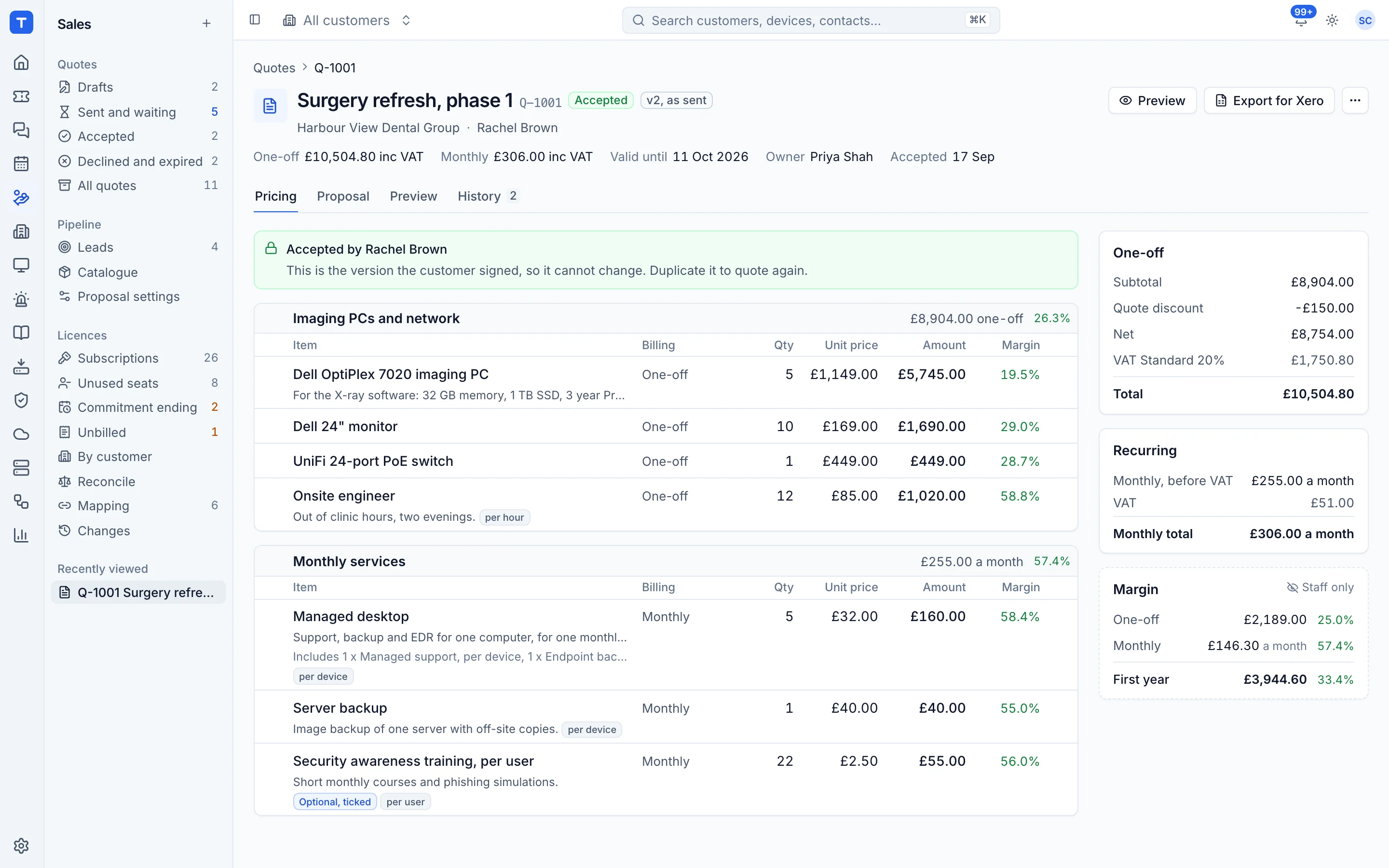
QuoteWerks is a well known quoting tool, available on the web, on the desktop or both, with deep distributor and CRM integrations. Tenvara puts quoting in the same app as your service desk, contracts and licences, with online signing included. It suits MSPs who want signed work to set itself up rather than be passed between tools.
The tool today
What QuoteWerks does
Long-standing quoting software with distributor content, web or desktop editions and CRM links. Made by Aspire Technologies. This is how the vendor describes it, in our words.
- Branded quotes and proposals, as QuoteWerks Web, Desktop or Hybrid.
- Distributor pricing and product content from D&H, Ingram Micro, TD SYNNEX, Pax8 and others.
- Approval workflows, margin control and discount management.
- QuoteValet, an optional subscription for online acceptance, e-signature and payments.
- Integrations with CRMs and PSAs such as Salesforce, HubSpot, Autotask and ConnectWise PSA.
Side by side
Tenvara vs QuoteWerks
The quoting and sales jobs that matter most, and how each product handles them. Then what else comes with Tenvara, such as a service desk, RMM and remote access, in the same app.
Catalogue with cost, price and margin
Product database and content subscription
Branded proposals
Branded quotes and proposals
Online acceptance with e-signature
Through QuoteValet, an optional subscription
Knowing when a quote is viewed
QuoteValet shows when the quote is viewed
Automatic follow-up reminders
QuoteValet auto-reminders
Customer picks options and quantities
QuoteValet: approved options and quantities
Leads and prospects
Built-in contacts; CRM through integrations
Distributor pricing and content
Ingram Micro, TD SYNNEX, D&H, Pax8 and more
Online payment
QuoteValet with 80+ payment gateways
Approval workflows
Approval workflow automation
Accounting
QuickBooks Online integration, paid add-on
Purchase orders from a won quote
Purchase orders from quotes or sales orders
Sales commission
By sale, by profit or on a sliding scale
Deals on a pipeline with a forecast
Pipeline through CRMs and PSAs such as HubSpot and Autotask
Also in Tenvara
What else you get with Tenvara, in the same app
PSA and service desk
Not included; integrates with Autotask and ConnectWise PSA
Remote monitoring and alerts
Not included
Remote access
Not included
Microsoft 365 management
Not included
Endpoint, server and VM backup
Not included
Microsoft 365 backup
Not included
IT documentation
Not included
Security monitoring
Not included
Project management
Not included; integrates with PSA tools
Add-on means the vendor sells it as a separate product or paid extra. QuoteWerks details come from the vendor's own website, see sources.
The one-app pitch
What else you'd replace
Most MSPs running QuoteWerks pay for several other tools beside it. Tenvara does these jobs too, on the same customer record, with one agent and one login.
See every comparisonSwitching
Moving from QuoteWerks
A calm move, not a big bang. Run both side by side until your team is happy.
How a gradual move to Tenvara works-
1
Bring your catalogue across
Export your product list to a spreadsheet, match the column layout from a Tenvara catalogue export, and import the CSV. The file is checked first and applied all or nothing.
The catalogue -
2
Set up your proposal templates
Add your logo, accent colour, company details and standard wording. Keep one template per kind of work.
Proposal wording and templates -
3
Set up customers, contacts and leads
Add the customers you quote for, and prospects as leads. When a lead accepts, it becomes a customer with its contact and quotes moved across.
Leads -
4
Bring your CRM history across
If your deals live in Zoho CRM, HubSpot or Pipedrive, import its export from Settings > Migration: accounts, contacts, leads, deals and their notes and activities, checked in a dry run first.
Importing from Zoho CRM, HubSpot or Pipedrive -
5
Finish open quotes, then switch
Let quotes already with customers finish in QuoteWerks and write new ones in Tenvara, then retire QuoteWerks.
QuoteWerks pricing
QuoteWerks publishes its prices on its website. Check its pricing page for current prices and terms.
Vendor pricing pageTenvara pricing
One product with every feature included, hosted or self-hosted. Tenvara is new and in beta, and pricing is announced before launch.
See pricingQuestions
QuoteWerks vs Tenvara: FAQ
Recurring lines go on their contract, one-off work becomes a project or a ticket, draft purchase orders can be raised for the hardware, a lead becomes a customer and the one-off items are ready to invoice.
Yes. The catalogue imports and exports CSV. Each row updates the item with the same SKU (or the same name) or adds a new one, so a Tenvara export makes the easiest template.
Yes. Edit it as a new version. The customer keeps seeing the version they were sent until you send the next one, and History compares any two versions line by line.
Yes. Publish a quote to the portal and signed-in contacts can open, download and accept it there, as well as from the emailed link.
More quoting and sales comparisons
Tenvara is coming soon.
Apply for the beta to run Tenvara side by side with QuoteWerks before you decide, or get launch updates and hear first when pricing is announced.
Comparison based on publicly available information as of September 2026. QuoteWerks is a trademark of its owner; Tenvara is not affiliated with it. Spotted something out of date? Tell us and we'll correct it.
Sources