Compare: Microsoft 365 management
Microsoft 365 Lighthouse alternative: Tenvara
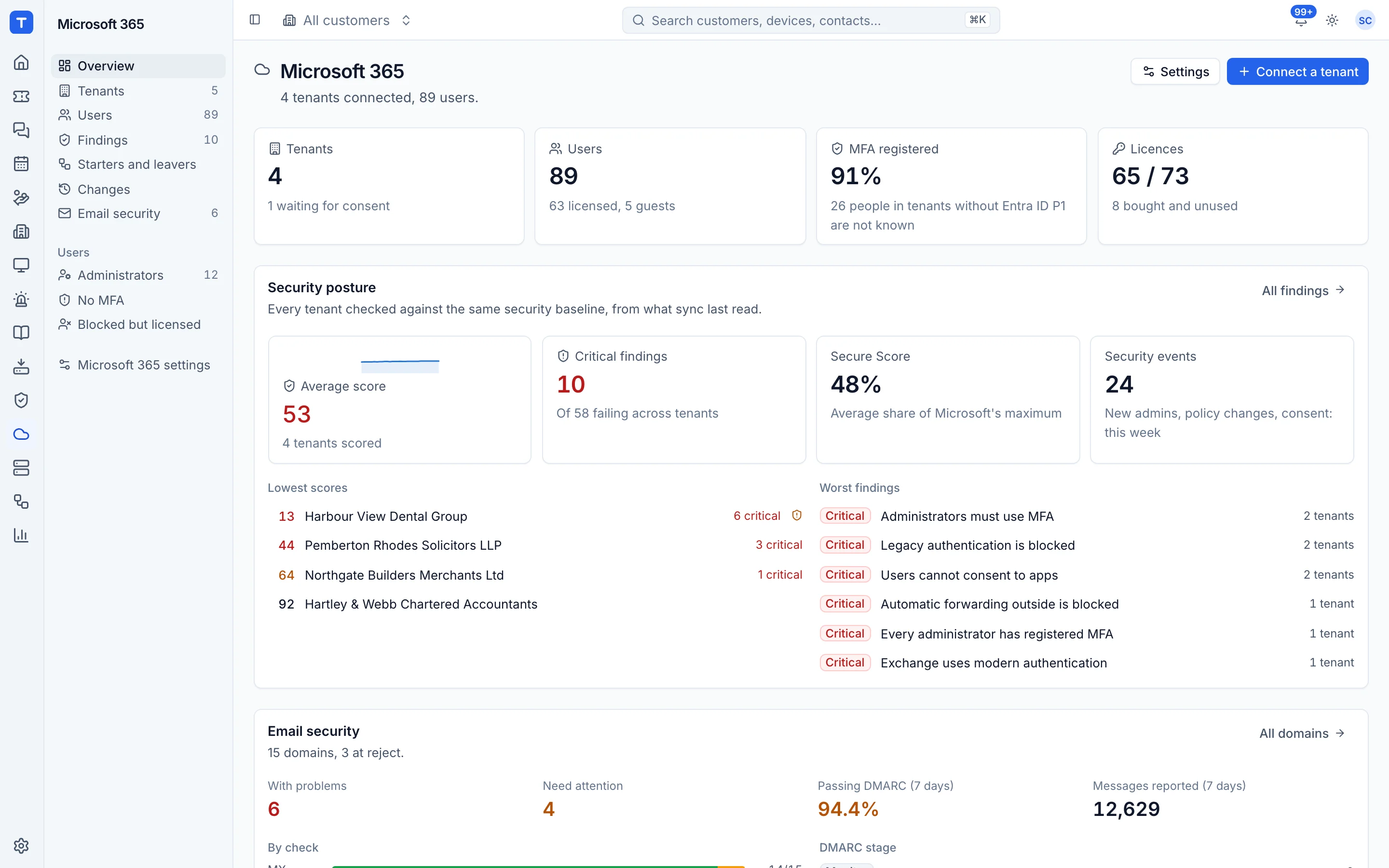
Microsoft 365 Lighthouse is Microsoft's own portal for partners in the Cloud Solution Provider programme, free to use, with baselines, user and device views and risky sign-ins across customer tenants. Tenvara covers the tenant security and user side too, and works for any customer through an admin consent link as well as through GDAP. It also puts that work next to your tickets, devices, licence billing and backup. Since Lighthouse costs nothing, you can happily use both.
The tool today
What Microsoft 365 Lighthouse does
Microsoft's free multi-tenant portal for CSP partners to secure and manage customer tenants. Made by Microsoft. This is how the vendor describes it, in our words.
- Multi-tenant views across customer users, devices and data, for CSP partners.
- A default baseline for small and medium businesses, with deployment tasks per tenant.
- Device compliance insights for Intune-enrolled devices and Defender threat details.
- Common tasks such as password resets, MFA and self-service password reset set-up, and risky sign-ins.
- Microsoft 365 service incidents and advisories affecting the tenants you manage.
- AI-driven sales and retention recommendations for account managers.
Side by side
Tenvara vs Microsoft 365 Lighthouse
The Microsoft 365 management jobs that matter most, and how each product handles them. Then what else comes with Tenvara, such as a service desk, Microsoft 365 backup and licence billing, in the same app.
Every customer tenant in one place
Multi-tenant views for CSP partners
Customers without GDAP
Needs GDAP or DAP to onboard a tenant
Security baseline per tenant
Default SMB baseline with deployment tasks
Password and MFA resets
Password resets, MFA and SSPR tools
Risky sign-ins
Risky sign-ins and risky users
Defender threats
Defender threat details for Windows devices
Intune device compliance and policies
Compliance views and policy comparison
Copilot and AI readiness
Copilot insights: usage, licences and deployment tasks
Conditional Access policies
Deployed as baseline tasks with a deployment state
Also in Tenvara
What else you get with Tenvara, in the same app
PSA and service desk
Not included
Microsoft 365 backup
Separate product: Microsoft 365 Backup, billed per GB
Licence sync and billing
Not included
Remote access
Not included
IT documentation
Not included
Credentials vault
Not included
Customer portal
Not included
Hybrid Active Directory
Synced users reset, unlocked and changed on the customer's domain controller through the agent Guide
Not part of Lighthouse; covers Microsoft 365 cloud tenants
Compliance programmes
ISO 27001, ISO 9001, UK GDPR and Cyber Essentials programmes with policies, risks and evidence Guide
Not included
Add-on means the vendor sells it as a separate product or paid extra. Microsoft 365 Lighthouse details come from the vendor's own website, see sources.
The one-app pitch
What else you'd replace
Most MSPs running Microsoft 365 Lighthouse pay for several other tools beside it. Tenvara does these jobs too, on the same customer record, with one agent and one login.
See every comparisonSwitching
Moving from Microsoft 365 Lighthouse
A calm move, not a big bang. Run both side by side until your team is happy.
How a gradual move to Tenvara works-
1
Connect your tenants
Register Tenvara's multi-tenant app once. Connect GDAP customers straight from your relationships, and everyone else with an admin consent link.
Connecting a tenant -
2
Review the findings
After the first sync each tenant gets a posture score. Fix what you can in a click and accept agreed risks with a reason and an end date.
Security findings -
3
Deploy the agent for device work
Patching, scripts and software go through Tenvara's agent, which can be rolled out through Intune or any MDM that runs a script.
Installing the agent -
4
Run both side by side
Lighthouse is free for CSP partners, so keep it open while the team runs day-to-day tenant work, starters and leavers from Tenvara.
Microsoft 365 Lighthouse pricing
Microsoft 365 Lighthouse is free for partners in the Cloud Solution Provider programme.
Vendor pricing pageTenvara pricing
One product with every feature included, hosted or self-hosted. Tenvara is new and in beta, and pricing is announced before launch.
See pricingQuestions
Microsoft 365 Lighthouse vs Tenvara: FAQ
Yes. Send the customer's global admin an admin consent link, which works for any tenant, partner or not. GDAP customers can be connected straight from your partner relationships.
Yes. A leaver runs ordered steps now or at a set time, such as 17:30 on their last day, and every step is logged and can be undone where Microsoft allows.
Many checks have a Fix button, from Conditional Access templates and Authenticator settings to the audit log and DKIM. Each fix shows a preview and is recorded so it can be put back.
Yes. Every change made through Tenvara goes into the change log with who made it, what it was before and Microsoft's response, and high-risk changes can need an administrator's approval.
More Microsoft 365 management comparisons
Tenvara is coming soon.
Apply for the beta to run Tenvara side by side with Microsoft 365 Lighthouse before you decide, or get launch updates and hear first when pricing is announced.
Comparison based on publicly available information as of September 2026. Microsoft 365 Lighthouse is a trademark of its owner; Tenvara is not affiliated with it. Spotted something out of date? Tell us and we'll correct it.
Sources