Compare: ITSM for IT teams
Jira Service Management alternative: Tenvara
Jira Service Management is Atlassian's service management tool, popular with IT teams that already run Jira and Confluence, and it covers requests, incidents, problems and changes, with more of the advanced ITSM practices on its Premium and Enterprise plans. IT teams look at Tenvara when they want the service desk next to the tools that look after the estate itself: the agent, patching, remote control, Microsoft 365, backup and security, on the same employee and device records.
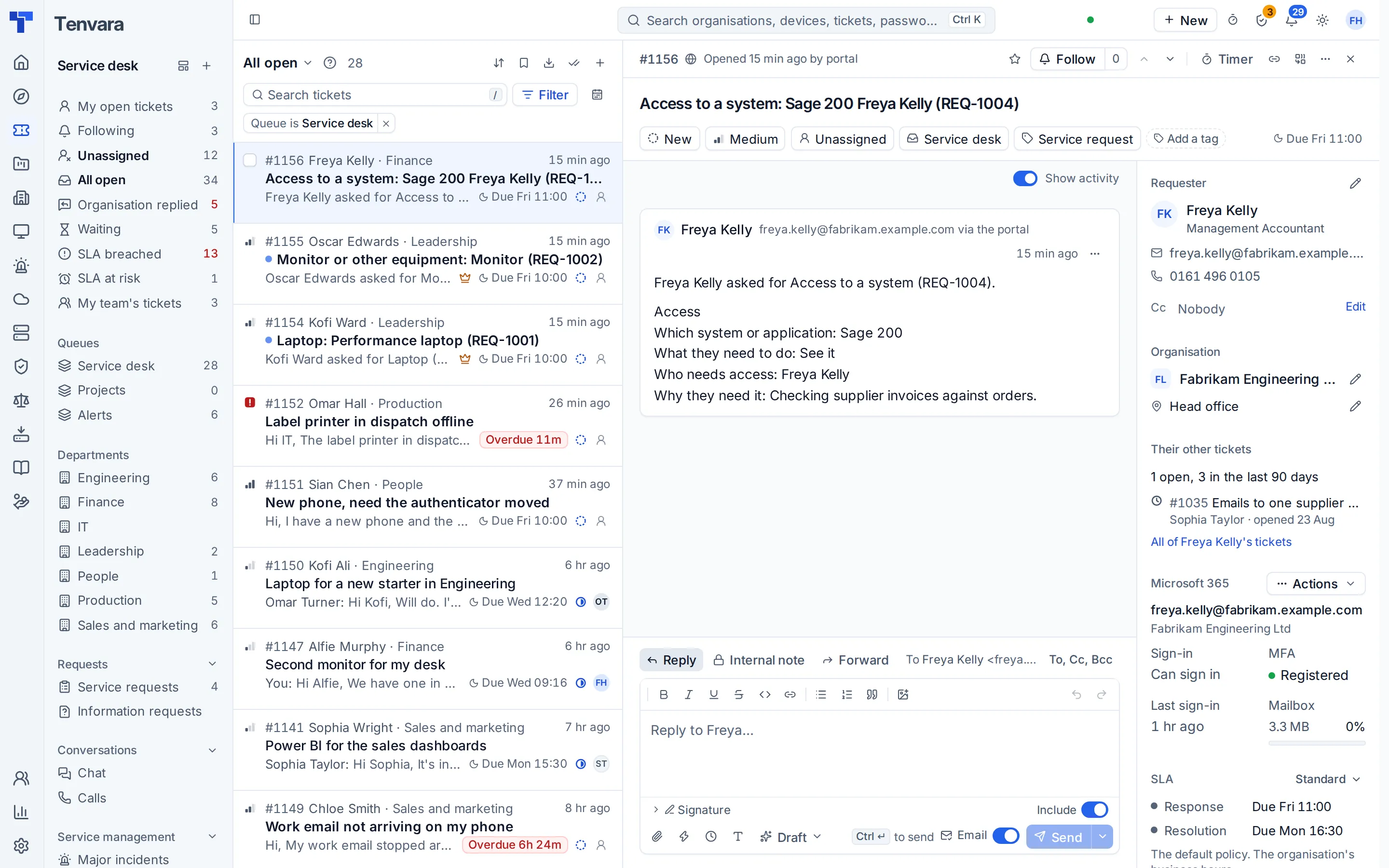
The tool today
What Jira Service Management does
Atlassian's service management tool for IT and business teams, built on Jira. Made by Atlassian. This is how the vendor describes it, in our words.
- Request management with request types, forms and a help center portal.
- Incident management with on-call schedules, routing and escalation policies.
- Problem and change management, a change calendar and major incidents on Premium and Enterprise.
- SLAs with calendars for working hours, and knowledge articles in the portal.
- Assets for inventory, ownership and lifecycles, plus status pages.
- Automation, reporting, AI features and mobile apps for iOS and Android.
Side by side
Tenvara vs Jira Service Management
The IT service management jobs that matter most, and how each product handles them. Then what else comes with Tenvara, such as RMM, remote access and patching, in the same app.
Incident management
Incident queues on every plan
Service requests and a catalogue with forms
Request types with forms and conditional sections
Manager approvals
Approval steps in request workflows
Problem management
Problem queues on Premium and Enterprise
Change management and a change calendar
Change calendar and risk on Premium and Enterprise
Major incidents
Major incidents on Premium and Enterprise
SLAs by priority, department or VIP
SLA goals by JQL, with working hours calendars
Ticket categories
Request types, grouped for the team and in the portal
On hold with a reason, SLA paused
SLA pause conditions, such as waiting for a customer
Knowledge base and self-service portal
Knowledge articles in the help center portal
Asset records and lifecycle
Assets for inventory, ownership and lifecycles
Status pages
Public or private status pages
On-call rotas
On-call schedules and escalation policies
AI on tickets
Virtual agent, similar ticket grouping and AI search
Mobile app for the IT team
iOS and Android apps
Also in Tenvara
What else you get with Tenvara, in the same app
Remote monitoring and alerts
Not included; alerts come in from other monitoring tools
Remote access
Not included
Patching
Not included
Endpoint, server and VM backup
Not included
Microsoft 365 backup
Not included
Microsoft 365 management
Not included
Security monitoring
Not included
Credentials vault
Not included
Add-on means the vendor sells it as a separate product or paid extra. Jira Service Management details come from the vendor's own website, see sources.
The one-app pitch
What else you'd replace
Most IT teams running Jira Service Management pay for several other tools beside it. Tenvara does these jobs too, on the same employee and device records, with one agent and one login.
See every comparisonSwitching
Moving from Jira Service Management
A calm move, not a big bang. Run both side by side until your team is happy.
-
1
Import your sites, employees, devices and assets
Save your sites, people, devices and assets as CSV files and import them in Settings, Migration, one file at a time. You match the columns, a dry run checks every row, and you can undo an import.
Importing from CSV -
2
Connect Microsoft 365
Give admin consent for your own tenant. Employees arrive with their departments, and licences and security settings come with them, with nothing to map.
Connecting a tenant -
3
Point the support mailbox at Tenvara
Connect the mailbox employees already write to, so new mail becomes tickets. Finish open requests in Jira Service Management while new tickets land in Tenvara.
Email to ticket and alert rules -
4
Deploy the agent
Install the agent on Windows, macOS and Linux with the one-line command or your usual deployment tool, so devices, patching and remote control are ready before you switch.
Installing the agent -
5
Go live
Run the two side by side while you check the findings report, then press We're live in the setup helper when the essentials are in place.
Go-live and Health
Jira Service Management pricing
Atlassian lists Free, Standard, Premium and Enterprise plans for Jira Service Management on its pricing page. Check it for current prices and terms.
Vendor pricing pageTenvara pricing
One product with every feature included, hosted or self-hosted. Tenvara is new and in beta, and pricing is announced before launch.
See pricingQuestions
Jira Service Management vs Tenvara: FAQ
Tenvara puts the service desk beside the agent, patching, remote control, Microsoft 365, backup and security, so a ticket shows its linked devices with their status and Remote in. Problems, changes, the change calendar and major incidents are part of the same service desk.
In the employee portal they raise tickets, read help articles and choose from the service catalogue under Request something. A request goes to their department manager first and then to IT, and an approved request for a laptop, equipment or software to buy becomes a purchase request by itself.
Yes. A ticket follows a chosen policy, a policy whose conditions it matches, its requester's department policy, the VIP policy or the default by priority, with clocks on business hours, chosen hours or 24/7.
Yes. Import your sites, employees, devices and assets from CSV, connect the support mailbox so new mail becomes tickets in Tenvara, and finish open requests in Jira Service Management. Tenvara stays in Getting started mode, with findings in one report, until you go live.
Hosted, on an instance run for you at yourname.tenvara.app, or self-hosted on your own Linux server with Docker Compose. It is the same product either way.
More IT service management comparisons
Tenvara is coming soon.
Apply for the beta to run Tenvara side by side with Jira Service Management before you decide, or get launch updates and hear first when pricing is announced.
Comparison based on publicly available information as of September 2026. Jira Service Management is a trademark of its owner; Tenvara is not affiliated with it. Spotted something out of date? Tell us and we'll correct it.
Sources
- Jira Service Management features
- Jira Service Management ITSM features
- Jira Service Management pricing
- Atlassian Service Collection
- Incident, problem and change management by plan
- Mark an incident as major
- Set up SLA calendars
- Set up SLA goals
- Use forms in Jira Service Management
- Add an approval step to a workflow
- Create and customize a status page
- Use request type groups
- Set up SLA conditions